- 특수 추첨 : 사용자가 지정한 최근 회차의 번호 출현 확률에 따라 가중치를 두고 번호를 추첨하는 방식
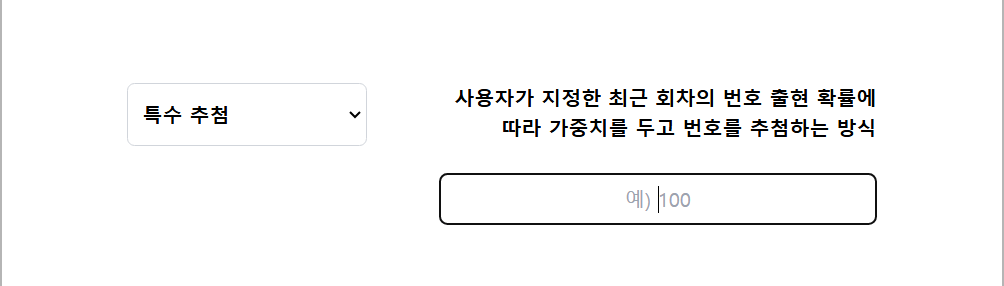
특수 추첨을 구현하기 위한 코드
/* pages/DrawPage.tsx 파일 */
import React, { useState } from "react";
import DropDown from "../components/DropDown";
import Button from "../components/Button";
import Animation from "../components/Animation";

function DrawPage() {
  const [selected, setSelected] = useState<"normal" | "special">("normal");
  const [specialInput, setSpecialInput] = useState<string>(""); //specialInput 상태 추가

  const handleSpecialInputChange = (input: string) => {
    setSpecialInput(input); // specialInput 값 변경
  };

  return (
    <div className="flex items-center justify-center min-h-screen bg-white">
      <div className="w-full max-w-[800px] bg-white p-0">
        <DropDown
          selected={selected}
          onChange={setSelected}
          specialInput={specialInput} // specialInput 값을 DropDown에 전달
          onSpecialInputChange={handleSpecialInputChange} // 값 변경 함수 전달
        />
        <Animation />
        <Button selected={selected} specialInput={specialInput} />{" "}
        {/* specialInput 전달 */}
      </div>
    </div>
  );
}

export default DrawPage;
- DrawPage가 Button.tsx와 DropDown.tsx의 부모 컴포넌트 이므로 가장 부모 컴포넌트에 선언을 한 후 page에 입력된 값을 자식 Components에 전달하여 사용함
/* DropDown.tsx */
import React from "react";

interface DropDownProps {
  selected: "normal" | "special";
  onChange: (selected: "normal" | "special") => void;
  specialInput: string; // 부모로부터 전달받은 specialInput
  onSpecialInputChange: (input: string) => void; // 값 변경 이벤트 핸들러
}

function DropDown({
  selected,
  onChange,
  specialInput,
  onSpecialInputChange,
}: DropDownProps) {
  const handleInputChange = (event: React.ChangeEvent<HTMLInputElement>) => {
    onSpecialInputChange(event.target.value); // specialInput 값을 부모로 전달
  };

  return (
    <div className="w-[600px] h-[150px] mt-8 flex justify-center">
      {/* 추첨 방식 선택 드롭다운 */}
      <select
        id="raffle-select"
        className="w-[200px] h-[50px] p-2 border border-gray-300 rounded-md focus:outline-none focus:ring-1 focus:ring-blue-500 text-black font-bold"
        value={selected}
        onChange={(e) => onChange(e.target.value as "normal" | "special")}
      >
        <option value="normal" className="text-black font-bold">
          일반 추첨
        </option>
        <option value="special" className="text-black font-bold">
          특수 추첨
        </option>
      </select>

      {/* 일반 추첨 설명 */}
      {selected === "normal" && (
        <p className="float-right pt-2 ml-[110px] text-black font-bold text-right">
          모든 지난 회차의 번호 출현 확률에 따라 <br /> 가중치를 두고 번호를
          추첨하는 방식
        </p>
      )}

      {/* 특수 추첨 - 사용자 입력 */}
      {selected === "special" && (
        <div className="ml-2">
          <p className="float-pt-2 ml-[54px] text-black font-bold text-right">
            사용자가 지정한 최근 회차의 번호 출현 확률에
            <br />
            따라 가중치를 두고 번호를 추첨하는 방식
          </p>

          {/* 입력 필드 */}
          <input
            style={{ color: "black" }}
            type="text"
            className="w-[350px] ml-[50px] mt-6 p-2 border border-gray-300 rounded-md text-center"
            placeholder="예) 100"
            value={specialInput} // 부모에서 전달받은 specialInput 값
            onChange={handleInputChange} // 입력 시 부모에 전달
          />
        </div>
      )}
    </div>
  );
}

export default DropDown;
- 입력 받은 값을 부모컴포넌트에 전달 함으로 써 DrawPages와 값이 연결되어짐.
/* Button.tsx */
import React, { useState } from "react";
import "./Button.css";

interface ButtonProps {
  selected: "normal" | "special";
  specialInput: string; // Pass the input value from DropDown
}

// SVG 파일 동적 임포트
const svgs = import.meta.glob("../assets/ball_*.svg", {
  eager: true,
}) as Record<string, { default: string }>;

// 숫자를 기반으로 파일 경로를 반환하는 함수
const getImageByNumber = (num: number) => {
  const filePath = `../assets/ball_${num}.svg`;
  return svgs[filePath]?.default || null;
};

function Button({ selected, specialInput }: ButtonProps) {
  const [result, setResult] = useState<string | null>(null);
  const [loading, setLoading] = useState<"none" | "singular" | "plural">(
    "none"
  );
  const handleClick = async (drawCount: number) => {
    const buttonType = drawCount === 1 ? "singular" : "plural";
    setLoading(buttonType); // 로딩 상태 활성화
    setResult(null); // 기존 결과 초기화

    try {
      let endpoint = "";
      if (selected === "normal") {
        endpoint =
          drawCount === 1
            ? "http://localhost:5000/api/single-draw"
            : "http://localhost:5000/api/multiple-draws";
      } else if (selected === "special") {
        endpoint =
          drawCount === 1
            ? "http://localhost:5000/api/draw-limited"
            : "http://localhost:5000/api/draw-limited-multiple";
      }

      console.log("Requesting API endpoint:", endpoint); // 1. API의 end point를 호출하여 확인

      // n 값을 쿼리 파라미터로 추가
      const url = new URL(endpoint);
      url.searchParams.append("n", specialInput);

      console.log("Special Input:", specialInput); // 2. Special Input 값이 제대로 들어갔는지 확인
      console.log("Generated URL:", url.toString()); // 3. Special Input이 URL의 쿼리 파라미터로 들어간 주소값 확인

      // 3초 지연 후 API 요청 처리
      await new Promise((resolve) => setTimeout(resolve, 2000));

      const response = await fetch(url.toString(), {
        method: "GET",
        headers: {
          "Content-Type": "application/json",
        },
      });
      if (!response.ok) {
        throw new Error(`HTTP error! status: ${response.status}`);
      }

      const data = await response.json();
      setResult(JSON.stringify(data, null, 2));
    } catch (error) {
      console.error("API 호출 중 오류 발생:", error);
      setResult("오류 발생: 데이터를 가져올 수 없습니다.");
    } finally {
      setLoading("none"); // 로딩 상태 비활성화
    }
  };

  return (
    <div className="w-[800px] flex flex-col items-center space-y-6">
      <div className="w-[600px] flex justify-between">
        <button
          onClick={() => handleClick(1)}
          className="w-[270px] h-[50px] bg-red-600 text-white py-2 rounded hover:bg-red-700 transition text-[20px] font-bold flex justify-center items-center"
          disabled={loading !== "none"} // 다른 버튼 클릭 방지
        >
          {loading === "singular" ? (
            <svg
              className="animate-spin h-6 w-6 text-white"
              xmlns="http://www.w3.org/2000/svg"
              fill="none"
              viewBox="0 0 24 24"
            >
              <circle
                className="opacity-25"
                cx="12"
                cy="12"
                r="10"
                stroke="currentColor"
                strokeWidth="4"
              ></circle>
              <path
                className="opacity-75"
                fill="currentColor"
                d="M4 12a8 8 0 018-8v4a4 4 0 00-4 4H4z"
              ></path>
            </svg>
          ) : (
            "1회 추첨"
          )}
        </button>
        <button
          onClick={() => handleClick(5)}
          className="w-[270px] h-[50px] bg-red-600 text-white py-2 rounded hover:bg-red-700 transition text-[20px] font-bold flex justify-center items-center"
          disabled={loading !== "none"} // 다른 버튼 클릭 방지
        >
          {loading === "plural" ? (
            <svg
              className="animate-spin h-6 w-6 text-white"
              xmlns="http://www.w3.org/2000/svg"
              fill="none"
              viewBox="0 0 24 24"
            >
              <circle
                className="opacity-25"
                cx="12"
                cy="12"
                r="10"
                stroke="currentColor"
                strokeWidth="4"
              ></circle>
              <path
                className="opacity-75"
                fill="currentColor"
                d="M4 12a8 8 0 018-8v4a4 4 0 00-4 4H4z"
              ></path>
            </svg>
          ) : (
            "5회 추첨"
          )}
        </button>
      </div>

      {/* 결과 렌더링 */}
      {result && (
        <div className="mt-4">
          <pre className="bg-gray-100 p-4 rounded-md">{result}</pre>
        </div>
      )}
    </div>
  );
}

export default Button;'사이드프로젝트' 카테고리의 다른 글
| [lottery] 추첨 기록 로그 컴포넌트 생성 및 추후 계획 (0) | 2024.12.23 |
|---|---|
| [lottery] 깃 허브 깃 용어 정리 (0) | 2024.12.17 |
| [lottery] 추첨치 추첨 애니메이션 추가 및 git 연동 (0) | 2024.12.17 |
| [lottery] 1차 코드 리뷰 및 개발 환경 조정 (0) | 2024.12.13 |
| [lottery] 애니메이션 개발 (0) | 2024.12.13 |