1차 파일 병합 후 여러가지 문제를 발견할 수 있었는데 그 원인의 대표적인 것은 아래와 같음.
- 개발 환경이 다름
- 친구는 프론트엔드를 그리고 나는 백엔드를 개발해왔기 때문에 서로 설치되어있는 툴도 다르고 환경도 달라 서로의 로컬이 같고 코드가 같더라도 돌아가는게 다름
- ex) 실제로 내 백엔드 코드에는 파이썬 항목에 CORS가 설정되지 않아도 flask_cors라는 패키지가 깔려있어 자동으로 돌아갔는데 친구는 파이썬 자체를 처음 접했기 때문에 코드 상에 없어도 cors패키지를 설치해야하는 문제가 있었음
- 친구는 프론트엔드를 그리고 나는 백엔드를 개발해왔기 때문에 서로 설치되어있는 툴도 다르고 환경도 달라 서로의 로컬이 같고 코드가 같더라도 돌아가는게 다름
- 생각하는 구조가 다름
- 친구는 UI / UX의 개발을 우선적으로 생각하며, 나는 API가 제대로 돌아가는 것이 먼저이니 CSS는 전부 우선순위에서 뒤로 미루자는 의견을 하게 되었음.
- 이 부분에서 서로 맞춰가며 (작은 CSS를 뒤로 미루고 큰 CSS는 그래도 직관적으로 보이게 하게 설정하는 등) 개발을 진행함
이에 따라 1차 코드리뷰를 조금 이르게 진행하였고, 아래와 같이 진행되었음
담당자 : 프론트, 백엔드
- 1차 파일 병합
- 패키지 라이브러리 통일
- API 호출 불러오기
- 폴더 구조 통일
이슈 해결
1. Animation.tsx에서 import.meta.glob에 대한 오류 해결 방안
1.1 tsconfig.json 수정
{
"compilerOptions": {
"target": "esnext",
"module": "esnext",
"types": ["vite/client"],
// 기타 옵션
}
}
1.2 declations.d.ts 파일 생성 후 해당 코드 선언 및 추가
/// <reference types="vite/client" />

interface ImportMeta {
glob: (pattern: string, options?: { eager?: boolean }) => Record<string, { default: string }>;
}
2. CORS 문제 해결
2.1 pip install flask_cors 설치
2.2 설치 후 lotto_service.py 파일 상단에 CORS 설정 추가
# 라이브러리 import
from flask import Flask, Response, request # flask 모듈에서 필요한 클래스와 객체를 가져옴
import pandas as pd # 데이터 처리를 위한 pandas 라이브러리
import numpy as np # 샘플링과 수학적 계산을 위한 numpy 라이브러리
import json # JSON 응답을 생성하기 위한 라이브러리
from collections import OrderedDict # 열 순서를 유지하기 위한 OrderedDict 클래스
from flask_cors import CORS
app = Flask(__name__) # flask 앱 초기화
CORS(app)
# 데이터 파일 경로 (추후 인터넷 URL로 변경 예정)
DATA_URL = "../data/lottoDB.csv"

##############################################################################################################################################
# 함수 선언부 #
##############################################################################################################################################

# 작성자 : 박건혁
# 작성일 : 2024-12-09
# 목  적 : 데이터를 로드하고 정렬하는 함수
# 메서드 : CSV 파일을 pandas 데이터프레임으로 로드 후 최신 날짜 기준으로 정렬
# 반환값 : sorted_data -> 최신 날짜로 정렬된 data 프레임
def load_and_sort_data():
    # CSV 파일을 pandas 데이터프레임으로 로드
    lotto_data = pd.read_csv(DATA_URL)

    # 최신 날짜 기준으로 정렬 (마지막 줄이 첫 번째 줄로 올라옴)
    sorted_data = lotto_data.iloc[::-1].reset_index(drop=True)
    return sorted_data

# 작성자 : 박건혁
# 작성일 : 2024-12-09
# 목  적 : 특정한 확률을 적용하여 숫자 6개를 뽑는 함수 (1회 추출)
# 메서드 : 추첨 데이터에서 필요한 열만 추출 -> 모든 숫자를 1차원 배열로 변환 ->
#          숫자별 등장 횟수 계산 -> 총 추첨 횟수를 통한 각 숫자의 확률 계산(빈도 수) ->
#          확률에 기반해 6개의 숫자를 샘플링하여 추출 -> 리스트로 반환
# 반환값 : 리스트로 반환된 1회의 추출 숫자 수
def single_draw(data):
    # 추첨 데이터에서 필요한 열만 추출
    numbers = data[["one", "two", "three", "four", "five", "six"]]
    # 모든 숫자를 1차원 배열로 변환
    all_numbers = numbers.values.flatten()
    # 숫자별 등장 횟수 계싼
    number_counts = pd.Series(all_numbers).value_counts().sort_index()
    # 총 추첨 횟수
    total_draws = len(data)
    # 각 숫자의 확률 계산 (빈도 수 계산)
    number_probabilities = number_counts / (6 * total_draws)
    # 확률에 기반하여 6개의 숫자를 샘플링
    sampled_numbers = np.random.choice(
        number_counts.index, size=6, replace=False, p=number_probabilities.values
    )
    # 리스트로 반환
    return sampled_numbers.tolist()

# 작성자 : 박건혁
# 작성일 : 2024-12-09
# 목  적 : 특정 범위 횟수안에서 등장한 숫자를 가지고 숫자 6개를 뽑는 함수
# 메서드 : 특정 범위를 선택 (최근 n회의 데이터 선택) -> 이후 single_draw와 동일
def limited_draw(data, recent_count):
    # 최근 n회 데이터만 선택
    recent_data = data.head(recent_count)
    numbers = recent_data[["one", "two", "three", "four", "five", "six"]]
    all_numbers = numbers.values.flatten()

    # 숫자별 빈도 계산 및 확률 계산
    number_counts = pd.Series(all_numbers).value_counts().sort_index()
    total_draws = len(recent_data)
    number_probabilities = number_counts / (6 * total_draws)

    # 샘플링
    sampled_numbers = np.random.choice(
        number_counts.index, size=6, replace=False, p=number_probabilities.values
    )
    return sampled_numbers.tolist()

##############################################################################################################################################
# API 반환부 #
##############################################################################################################################################

# 작성자 : 박건혁
# 작성일 : 2024-12-09
# 목  적 : 복권 데이터를 정렬된 형식으로 반환하는 API
# 입력값 : 없음
# 메서드 : 1. 데이터를 로드하고 최신 날짜 기준으로 정렬 / 2. 열 순서를 유지하여 JSON 포맷으로 변환
# 반환값 : JSON 형식으로 정렬된 복권 데이터
@app.route("/api/data", methods=["GET"])
def get_data():
    # 최신 데이터 로드
    data = load_and_sort_data()
    if data is None:
        return Response(json.dumps({"error": "데이터를 로드할 수 없습니다."}), status=500, mimetype='application/json')

    # 열 순서 유지
    column_order = ["Index", "date", "one", "two", "three", "four", "five", "six", "bonus"]
    if set(column_order) == set(data.columns):
        data = data[column_order]

    # JSON으로 변환 (OrderedDict를 사용해 열 순서 유지)
    json_data = [
        OrderedDict((col, row[col]) for col in column_order) for _, row in data.iterrows()
    ]

    # JSON 문자열로 변환 후 응답
    return Response(json.dumps(json_data, ensure_ascii=False), mimetype='application/json')

# 작성자 : 박건혁
# 작성일 : 2024-12-09
# 목  적 : 확률에 기반하여 숫자 6개를 1회 추출 하는 API
# 입력값 : 없음
# 메서드 : 1. 전체 데이터를 로드 / 2. 숫자 6개를 샘플링하는 single_draw 함수 호출
# 반환값 : JSON 형식으로 반환된 숫자 6개
@app.route("/api/single-draw", methods=["GET"])
def get_single_draw():
    data = load_and_sort_data()
    draw_result = single_draw(data)
    return Response(json.dumps({"single_draw": draw_result}, ensure_ascii=False), mimetype='application/json')

# 작성자 : 박건혁
# 작성일 : 2024-12-09
# 목  적 : 확률에 기반하여 숫자 6개를 5번 추출하는 API
# 입력값 : 없음
# 메서드 : 1. 전체 데이터를 로드 / 2. 숫자 6개를 5번 샘플링하여 리스트로 반환
# 반환값 : JSON 형식으로 반환된 숫자 6개를 5번 추출한 결과
@app.route("/api/multiple-draws", methods=["GET"])
def get_multiple_draws():
    data = load_and_sort_data()
    results = []
    for _ in range(5):
        results.append(single_draw(data))
    return Response(json.dumps({"multiple_draws": results}, ensure_ascii=False), mimetype='application/json')

# 작성자 : 박건혁
# 작성일 : 2024-12-09
# 목  적 : 특정 범위 내에서 숫자 6개를 추출하는 API
# 입력값 : n (URL 쿼리 파라미터, 기본값 100 -> 기본값 100 추후 삭제 예정)
# 메서드 : 1. 최근 n회의 데이터를 로드 / 2. 제한된 범위 내에서 숫자 6개를 샘플링하는 limited_draw 함수 호출
# 반환값 : JSON 형식으로 반환된 숫자 6개
@app.route("/api/draw-limited", methods=["GET"])
def get_limited_draw():
    # 최근 n회 값 가져오기
    n = request.args.get("n", default=100, type=int)
    data = load_and_sort_data()

    # n회 이상 요청 시 전체 데이터로 제한
    if n > len(data):
        n = len(data)

    # 숫자 추출
    draw_result = limited_draw(data, n)
    return Response(json.dumps({"limited_draw": draw_result}, ensure_ascii=False), mimetype='application/json')

# 작성자 : 박건혁
# 작성일 : 2024-12-09
# 목  적 : 특정 범위 내에서 숫자 6개를 5번 추출하는 API
# 입력값 : n (URL 쿼리 파라미터, 기본값 100 -> 기본값 100 추후 삭제 예정)
# 메서드 : 1. 최근 n회의 데이터를 로드 / 2. 제한된 범위 내에서 숫자 6개를 5번 샘플링하는 `limited_draw` 함수 호출
# 반환값 : JSON 형식으로 반환된 숫자 6개를 5번 추출한 결과
@app.route("/api/draw-limited-multiple", methods=["GET"])
def get_limited_multiple_draws():
    # 최근 n회 값 가져오기
    n = request.args.get("n", default=100, type=int)
    data = load_and_sort_data()

    # n회 이상 요청 시 전체 데이터로 제한
    if n > len(data):
        n = len(data)

    # 5번 추출
    results = []
    for _ in range(5):
        results.append(limited_draw(data, n))

    return Response(json.dumps({"limited_multiple_draws": results}, ensure_ascii=False), mimetype='application/json')

# Flask 앱 실행
if __name__ == "__main__":
    app.run(debug=True)
기능 추가
담당자 : 프론트, 백엔드
1. 버튼 컴포넌트 상태변화 (클릭 시 로딩) 추가
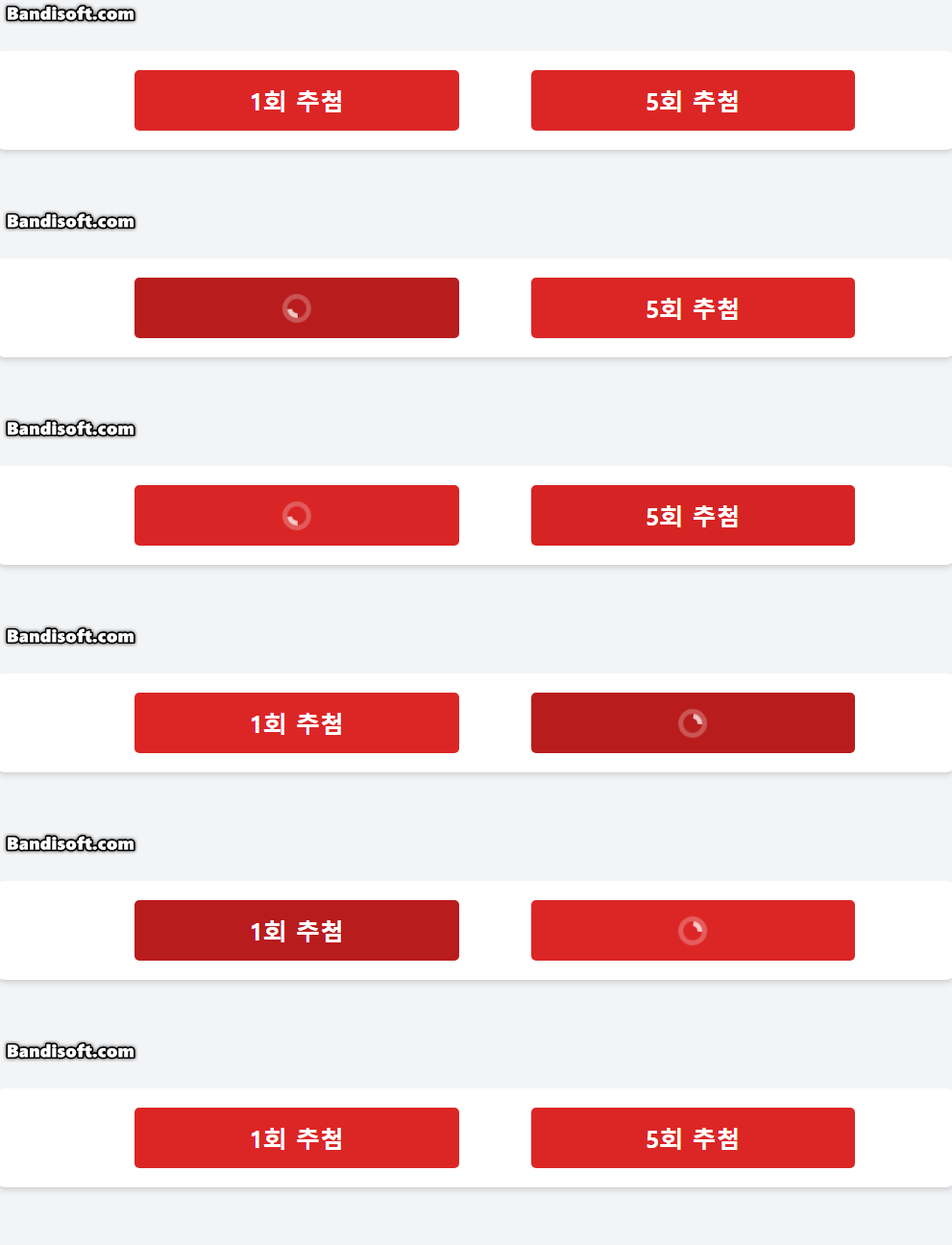
import React, { useState } from "react";

interface ButtonProps {
  selected: "normal" | "special";
}

function Button({ selected }: ButtonProps) {
  const [result, setResult] = useState<string | null>(null);
  const [loading, setLoading] = useState<"none" | "singular" | "plural">("none");

  const handleClick = async (drawCount: number) => {
    const buttonType = drawCount === 1 ? "singular" : "plural";
    setLoading(buttonType); // 로딩 상태 활성화
    setResult(null); // 기존 결과 초기화

    try {
      let endpoint = "";
      if (selected === "normal") {
        endpoint =
          drawCount === 1
            ? "http://localhost:5000/api/single-draw"
            : "http://localhost:5000/api/multiple-draws";
      } else if (selected === "special") {
        endpoint =
          drawCount === 1
            ? "http://localhost:5000/api/draw-limited"
            : "http://localhost:5000/api/draw-limited-multiple";
      }

      console.log("Requesting API endpoint:", endpoint);

      // 3초 지연 후 API 요청 처리
      await new Promise((resolve) => setTimeout(resolve, 2000));

      const response = await fetch(endpoint);
      if (!response.ok) {
        throw new Error(`HTTP error! status: ${response.status}`);
      }

      const data = await response.json();
      setResult(JSON.stringify(data, null, 2));
    } catch (error) {
      console.error("API 호출 중 오류 발생:", error);
      setResult("오류 발생: 데이터를 가져올 수 없습니다.");
    } finally {
      setLoading("none"); // 로딩 상태 비활성화
    }
  };

  return (
    <div className="w-[800px] flex flex-col items-center space-y-6">
      <div className="w-[600px] flex justify-between">
        <button
          onClick={() => handleClick(1)}
          className="w-[270px] h-[50px] bg-red-600 text-white py-2 rounded hover:bg-red-700 transition text-[20px] font-bold flex justify-center items-center"
          disabled={loading !== "none"} // 다른 버튼 클릭 방지
        >
          {loading === "singular" ? (
            <svg
              className="animate-spin h-6 w-6 text-white"
              xmlns="http://www.w3.org/2000/svg"
              fill="none"
              viewBox="0 0 24 24"
            >
              <circle
                className="opacity-25"
                cx="12"
                cy="12"
                r="10"
                stroke="currentColor"
                strokeWidth="4"
              ></circle>
              <path
                className="opacity-75"
                fill="currentColor"
                d="M4 12a8 8 0 018-8v4a4 4 0 00-4 4H4z"
              ></path>
            </svg>
          ) : (
            "1회 추첨"
          )}
        </button>
        <button
          onClick={() => handleClick(5)}
          className="w-[270px] h-[50px] bg-red-600 text-white py-2 rounded hover:bg-red-700 transition text-[20px] font-bold flex justify-center items-center"
          disabled={loading !== "none"} // 다른 버튼 클릭 방지
        >
          {loading === "plural" ? (
            <svg
              className="animate-spin h-6 w-6 text-white"
              xmlns="http://www.w3.org/2000/svg"
              fill="none"
              viewBox="0 0 24 24"
            >
              <circle
                className="opacity-25"
                cx="12"
                cy="12"
                r="10"
                stroke="currentColor"
                strokeWidth="4"
              ></circle>
              <path
                className="opacity-75"
                fill="currentColor"
                d="M4 12a8 8 0 018-8v4a4 4 0 00-4 4H4z"
              ></path>
            </svg>
          ) : (
            "5회 추첨"
          )}
        </button>
      </div>
      {/* <pre className="mt-6 bg-gray-200 rounded w-full max-w-[800px] overflow-auto">
        {result || "결과가 여기에 표시됩니다."}
      </pre> */}
    </div>
  );
}

export default Button;
2. SVG 파일 수정
2.1 파일 수정 스크립트 구현 (SVG 내 불 필요한 여백 및 공간 제거) -> 실행 후 파이썬 스크립트가 삭제 되도록
import os  # 운영 체제와 상호작용하기 위한 모듈
from xml.etree import ElementTree as ET  # XML 파일을 읽고, 수정하고, 저장하기 위한 모듈

# assets 폴더 내의 모든 SVG 파일을 수정하는 함수
def modify_svg_files():
    assets_folder = './assets'  # 현재 디렉토리 내의 'assets' 폴더 경로
    for file_name in os.listdir(assets_folder):  # assets 폴더 내의 모든 파일 이름을 반복
        if file_name.endswith('.svg'):  # 파일 이름이 '.svg'로 끝나는지 확인
            file_path = os.path.join(assets_folder, file_name)  # 파일의 전체 경로 생성
            try:
                modify_svg_file(file_path)  # 개별 SVG 파일 수정
                print(f"Modified: {file_name}")  # 수정된 파일 이름 출력
            except Exception as e:  # 수정 중 오류 발생 시
                print(f"Error modifying {file_name}: {e}")  # 오류 메시지 출력

# 개별 SVG 파일을 수정하는 함수
def modify_svg_file(file_path):
    tree = ET.parse(file_path)  # SVG 파일을 XML 트리로 파싱
    root = tree.getroot()  # XML 트리의 루트 요소 가져오기

    # viewBox 속성을 수정
    root.set('viewBox', '86.31 86.31 43.38 43.38')

    # 불필요한 <rect> 태그 제거
    for rect in root.findall('.//{http://www.w3.org/2000/svg}rect'):  # <rect> 태그 탐색
        if rect.get('width') == '100%' and rect.get('height') == '100%':  # 너비와 높이가 100%인 경우
            root.remove(rect)  # 해당 <rect> 태그 삭제

    # 불필요한 <defs> 및 <clipPath> 태그 제거
    for defs in root.findall('.//{http://www.w3.org/2000/svg}defs'):  # <defs> 태그 탐색
        root.remove(defs)  # 해당 <defs> 태그 삭제

    # 수정된 파일을 저장
    tree.write(file_path, encoding='utf-8', xml_declaration=True)  # 파일 저장 시 UTF-8 인코딩 사용

# Python 스크립트 실행 후 삭제
if __name__ == "__main__":  # 이 파일이 직접 실행될 때만 실행
    modify_svg_files()  # 모든 SVG 파일 수정 함수 호출
    print("All SVG files modified.")  # 작업 완료 메시지 출력
    os.remove(__file__)  # 현재 실행 중인 Python 스크립트 파일 삭제
    print("Python script deleted.")  # 스크립트 삭제 완료 메시지 출력
- 수정 된 assets.zip 파일
코드리뷰
코드를 수정하고 셋팅을 수정하면서 이에 따라 코드리뷰를 전체적으로 진행하였으며, 두 명의 개발자가 같이 진행하였음.
이에 따라 바뀐 코드를 공유
1. 애니메이션 수정 (SVG 파일 여백제거 변경 이슈)
/*Animation.tsx*/
import React from "react";

// SVG 파일 타입 정의
type SvgMap = {
  [key: string]: {
    default: string;
  };
};

const svgs: SvgMap = import.meta.glob("../assets/ball_*.svg", { eager: true });

interface BallPosition {
  x: number;
  y: number;
  dx: number;
  dy: number;
}

interface AnimationState {
  ballPositions: BallPosition[];
}

class Animation extends React.Component<{}, AnimationState> {
  private animationFrameId: number | null = null;

  constructor(props: {}) {
    super(props);
    this.state = {
      ballPositions: Array.from({ length: Object.keys(svgs).length }, () => ({
        x: Math.random() * 600, // 가로축 시작 지점 랜덤
        y: Math.random() * 300, // 세로축 시작 지점 랜덤
        dx: (Math.random() * 2 - 1) * 2, // 임의의 x 방향 속도
        dy: (Math.random() * 2 - 1) * 2, // 임의의 y 방향 속도
      })),
    };
  }

  componentDidMount() {
    this.animate();
  }

  componentWillUnmount() {
    if (this.animationFrameId) {
      cancelAnimationFrame(this.animationFrameId);
    }
  }

  animate = () => {
    this.setState((prevState) => {
      const newPositions = prevState.ballPositions.map((ball) => {
        let { x, y, dx, dy } = ball;

        // 위치 업데이트
        x += dx;
        y += dy;

        // 테두리에 닿았을 때 반사
        if (x < 0 || x > 600 - 50) {
          // 50은 공의 너비
          dx *= -1;
        }
        if (y < 0 || y > 300 - 50) {
          // 50은 공의 높이
          dy *= -1;
        }

        return { x, y, dx, dy };
      });

      return { ballPositions: newPositions };
    });

    this.animationFrameId = requestAnimationFrame(this.animate);
  };

  render() {
    return (
      // 컴포넌트 전체 배경
      <div className="w-[800px] h-screen flex justify-center items-center bg-white">
        {/* 추첨 애니메이션 범위 */}
        <div className="w-[600px] h-[300px] relative border-2 rounded-xl bg-gray-200 overflow-hidden">
          {this.state.ballPositions.map((ball, index) => (
            <img
              key={index}
              src={svgs[`../assets/ball_${index + 1}.svg`].default}
              alt={`Ball ${index + 1}`}
              className="absolute"
              style={{
                left: `${ball.x}px`,
                top: `${ball.y}px`,
                width: "50px", // 공의 가로 크기
                height: "50px", // 공의 세로 크기
              }}
            />
          ))}
        </div>
      </div>
    );
  }
}

export default Animation;
2. 당첨 기록 구현
2.1 BackEnd 코드 수정 (당첨 기록 불러오는 부분 한번에 10개씩 불러올 수 있도록 수정)
# Backend 코드 수정
# 작성자 : 박건혁
# 작성일 : 2024-12-09
# 수정일 : 2024-12-12
# 목  적 : 복권 데이터를 정렬된 형식으로 반환하는 API
# 입력값 : 없음
# 수정 전 메서드 : 1. 데이터를 로드하고 최신 날짜 기준으로 정렬 / 2. 열 순서를 유지하여 JSON 포맷으로 변환
# 수정 후 메서드 : 1. 데이터를 로드 후 페이지 번호와 한 페이지당 항목 수를 쿼리파라미터로 받음
#                 2. 데이터의 시작과 끝 인덱스 계산 / 3. 데이터가 없을 경우 에러처리 / 4. JSON 포맷으로 변환하여 전송
# 반환값 : JSON 형식으로 정렬된 복권 데이터
@app.route("/api/data", methods=["GET"])
def get_paginated_data():
    # 최신 데이터 로드
    data = load_and_sort_data()
    if data is None:
        return Response(json.dumps({"error": "데이터를 로드할 수 없습니다."}), status=500, mimetype='application/json')
    # 페이지 번호와 한 페이지당 항목 수를 쿼리 파라미터로 받기 (기본값: page=1, limit=10)
    page = request.args.get("page", default=1, type=int)
    limit = request.args.get("limit", default=10, type=int)
    # 데이터의 시작 및 끝 인덱스 계산
    start_index = (page - 1) * limit
    end_index = start_index + limit
    # 해당 페이지에 해당하는 데이터 추출
    paginated_data = data.iloc[start_index:end_index]
    # 데이터가 없을 경우 에러 처리
    if paginated_data.empty:
        return Response(json.dumps({"error": "더 이상 데이터가 없습니다."}), status=404, mimetype='application/json')
    # 열 순서 유지
    column_order = ["Index", "date", "one", "two", "three", "four", "five", "six", "bonus"]
    if set(column_order) == set(data.columns):
        paginated_data = paginated_data[column_order]
    # JSON으로 변환 (OrderedDict를 사용해 열 순서 유지)
    json_data = [
        OrderedDict((col, row[col]) for col in column_order) for _, row in paginated_data.iterrows()
    ]
    # JSON 문자열로 변환 후 응답
    return Response(json.dumps(json_data, ensure_ascii=False), mimetype='application/json')
2.2 프론트엔트 구현 (백엔드 개발자 + 프론트엔드 개발자 담당)
import React, { useEffect, useState, useRef } from "react";

// LottoRecord 인터페이스: 로또 데이터가 어떤 형식인지 정의
interface LottoRecord {
  Index: number; // 로또 회차
  date: string; // 추첨 날짜
  one: number; // 당첨 숫자 1
  two: number; // 당첨 숫자 2
  three: number; // 당첨 숫자 3
  four: number; // 당첨 숫자 4
  five: number; // 당첨 숫자 5
  six: number; // 당첨 숫자 6
  bonus: number; // 보너스 숫자
}

// SVG 파일들을 동적으로 가져오기
const svgs = import.meta.glob("../assets/ball_*.svg", {
  eager: true,
}) as Record<string, { default: string }>;

const LottoCard = ({ record }: { record: LottoRecord }) => {
  return (
    <div className="flex items-center justify-between w-[700px] p-3 mb-4 bg-white rounded-lg shadow-md">
      <div className="flex flex-col items-start text-sm mr-1">
        <div className="font-bold text-gray-500">{record.Index}회</div>
        <div className="text-gray-400">{record.date}</div>
      </div>
      <div className="flex items-center">
        {[
          record.one,
          record.two,
          record.three,
          record.four,
          record.five,
          record.six,
        ].map((num, idx) => (
          <img
            key={idx}
            src={svgs[`../assets/ball_${num}.svg`]?.default} // 올바르게 타입 강제 변환
            alt={`ball_${num}`}
            className="w-12 h-12 mr-1"
          />
        ))}
        <span className="text-lg font-bold text-gray-500 mx-1">+</span>
        <img
          src={svgs[`../assets/ball_${record.bonus}.svg`]?.default} // 올바르게 타입 강제 변환
          alt={`ball_${record.bonus}`}
          className="w-12 h-12 ml-1"
        />
      </div>
    </div>
  );
};

function Record() {
  const [records, setRecords] = useState<LottoRecord[]>([]); // 로또 데이터 저장
  const [loading, setLoading] = useState(false); // 로딩 상태
  const [error, setError] = useState<string | null>(null); // 에러 메시지
  const [hasMore, setHasMore] = useState(true); // 더 많은 데이터 여부
  const [currentPage, setCurrentPage] = useState(1); // 현재 페이지 번호
  const ITEMS_PER_PAGE = 10; // 한 번에 불러올 데이터 개수
  const scrollContainerRef = useRef<HTMLDivElement>(null); // 스크롤 컨테이너 참조

  const fetchData = async (page: number) => {
    try {
      setLoading(true); // 로딩 시작
      const response = await fetch(
        `http://localhost:5000/api/data?page=${page}&limit=${ITEMS_PER_PAGE}`
      );
      if (!response.ok) {
        throw new Error(`HTTP error! status: ${response.status}`);
      }
      const data = await response.json(); // JSON 데이터 파싱
      setRecords((prevRecords) => [...prevRecords, ...data]); // 기존 데이터에 새 데이터 추가
      setHasMore(data.length === ITEMS_PER_PAGE); // 데이터가 더 있는지 확인
    } catch (err) {
      console.error("Error fetching data:", err);
      setError("데이터를 가져오는 데 실패했습니다.");
    } finally {
      setLoading(false); // 로딩 종료
    }
  };

  useEffect(() => {
    fetchData(currentPage);
  }, [currentPage]);

  const handleScroll = () => {
    if (loading || !hasMore || !scrollContainerRef.current) return;

    const { scrollTop, scrollHeight, clientHeight } =
      scrollContainerRef.current;

    if (scrollHeight - scrollTop <= clientHeight + 50) {
      setCurrentPage((prevPage) => prevPage + 1);
    }
  };

  useEffect(() => {
    const container = scrollContainerRef.current;
    if (container) {
      container.addEventListener("scroll", handleScroll);
      return () => container.removeEventListener("scroll", handleScroll);
    }
  }, [loading, hasMore]);

  if (error) {
    return (
      <div className="flex justify-center items-center min-h-screen text-red-500">
        {error}
      </div>
    );
  }

  return (
    <div
      ref={scrollContainerRef}
      className="flex flex-col items-center bg-gray-100 min-h-screen p-4 overflow-y-auto"
      style={{ maxHeight: "100vh" }}
    >
      {records.map((record) => (
        <LottoCard key={record.Index} record={record} />
      ))}
      {loading && (
        <div className="flex justify-center items-center mt-4">로딩 중...</div>
      )}
      {!hasMore && (
        <div className="text-gray-500 mt-4">더 이상 데이터가 없습니다.</div>
      )}
    </div>
  );
}

export default Record;
3. App.tsx 수정 (Header 삽입 하고 DrawPage에 Header 삭제)
/*App.tsx*/
import React, { useState } from "react";
import { Route, Routes, useNavigate } from "react-router-dom";
import DrawPage from "./pages/DrawPage";
import Record from "./pages/Record";
import Header from "./components/Header";

function App() {
  const [activeTab, setActiveTab] = useState("lottery");
  const navigate = useNavigate();

  const handleTabChange = (tab: string) => {
    setActiveTab(tab);
    if (tab === "lottery") {
      navigate("/");
    } else if (tab === "record") {
      navigate("/record");
    }
  };

  return (
    <div>
      <Header activeTab={activeTab} onTabChange={handleTabChange} />
      <Routes>
        <Route path="/" element={<DrawPage />} />
        <Route path="/record" element={<Record />} />
      </Routes>
    </div>
  );
}

export default App;
4. main.tsx 수정 -> navigation 기능 삭제
/*main.tsx*/
import React from "react";
import ReactDOM from "react-dom/client";
import { BrowserRouter } from "react-router-dom";
import App from "./App";
import "./index.css";

const rootElement = document.getElementById("root");

if (rootElement) {
  ReactDOM.createRoot(rootElement).render(
    <React.StrictMode>
      <BrowserRouter>
        <App />
      </BrowserRouter>
    </React.StrictMode>
  );
} else {
  console.error(
    "Root element not found. Make sure 'root' exists in your HTML."
  );
}
이상으로 금일 까지 진행된 상황을 완료하며 진행된 상황을 확인하면 아래와 같음
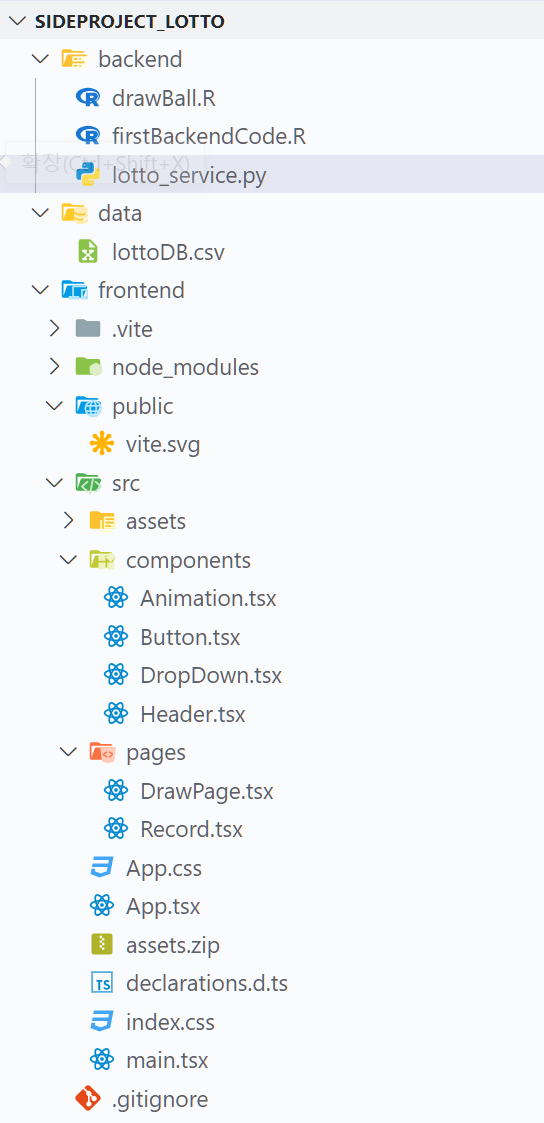

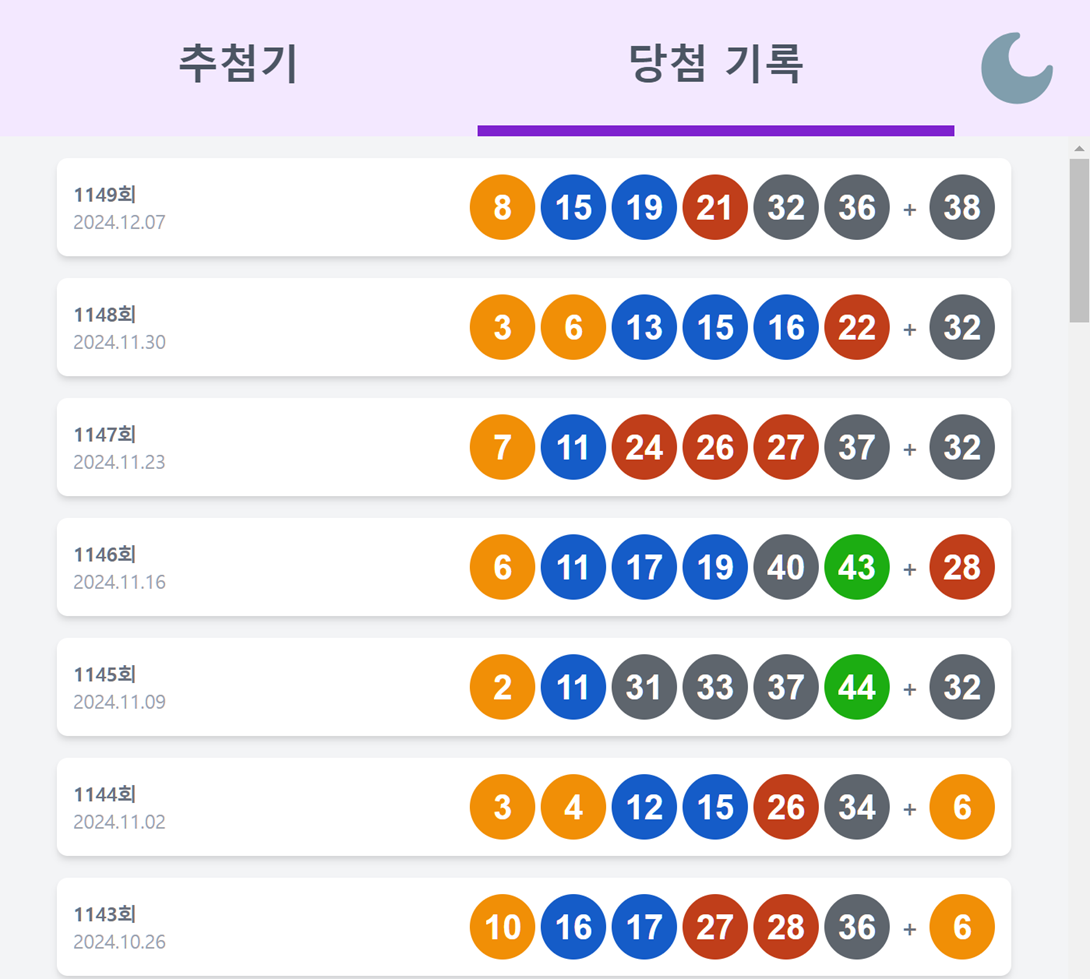
'사이드프로젝트' 카테고리의 다른 글
| [lottery] 드롭다운 영역 특수 추첨 api 적용 (2) | 2024.12.17 |
|---|---|
| [lottery] 추첨치 추첨 애니메이션 추가 및 git 연동 (0) | 2024.12.17 |
| [lottery] 애니메이션 개발 (0) | 2024.12.13 |
| [lottery] 사이드 프로젝트 2차 회의 (0) | 2024.12.10 |
| [lottery] 사이드 프로젝트 1차 회의 (0) | 2024.12.10 |